Setting Up the Tag Catalog
Understand how Tag Groups, Tags, and Tag Hierarchies work together as one-time metadata configuration that powers your question bank, question papers and more.
Before you can create questions or build assessments in EasyPrep, you need to configure your Tag Catalog — the metadata system that describes and classifies all your content. This is a one-time setup. Once it is in place, every question you add, every paper you create, and every report you run will be built on top of it.
# The Three Building Blocks
The Tag Catalog has three layers, each depending on the one before it:
Tag Groups  →  Tags  →  Tag Hierarchies
(categories)  (values)   (relationships)
# Tag Groups — the categories
A Tag Group defines a dimension along which you want to classify content. Think of it as a column heading in a table:
| Subject | Chapter | Difficulty | Exam Board |
|---|---|---|---|
| Physics | Thermodynamics | Medium | CBSE |
| Chemistry | Organic Chemistry | Hard | JEE |
The column headings (Subject, Chapter, Difficulty, Exam Board) are Tag Groups. You decide which dimensions matter for your institute.
Common examples: Subject, Topic, Chapter, Difficulty Level, Cognitive Level, Exam Board, Language.
# Tags — the values
A Tag is a specific value inside a Tag Group. Under the Subject group you would create tags like Physics, Chemistry, Mathematics. Under Difficulty Level you would create Easy, Medium, Hard.
Every question and assessment can be labelled with one tag from each group that applies to it.
# Tag Hierarchies — the relationships
A Tag Hierarchy connects tags across groups in a parent-child tree. For example:
Subject (Level 1)
  └── Chapter (Level 2)
        └── Sub Topic (Level 3)
Mapping Physics → Thermodynamics → Laws of Thermodynamics means the system knows these three tags are related. This powers student's navigation to content, filtering of resources, and resource linking and assessment analytics.
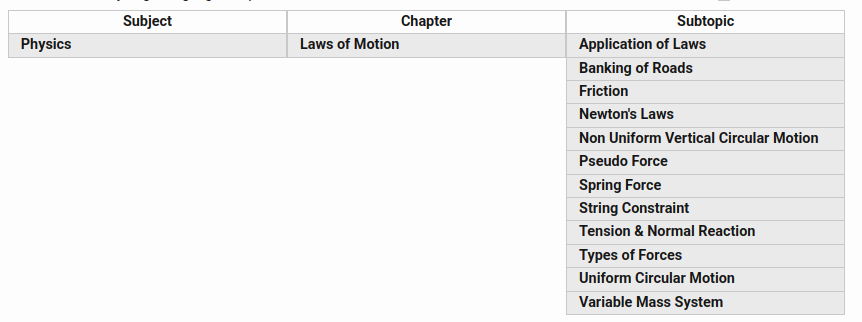
Figure: Subject, Chapter and Subtopic are different levels of hierarchy and they are showing Tag relationships too.
# How the Tag Catalog Powers Your Work
Once configured, the Tag Catalog drives everything else in EasyPrep:
| Feature | How tags are used |
|---|---|
| Question Bank | Every question should be tagged so you can filter, search, and pick questions by subject, difficulty, etc. |
| Question Paper | Each paper should also be tagged so that student can see the papers of that Tag. Also, filtering and search is possible. |
| Hierarchy-guided Picker | Student selects a course and the picker narrows the available chapters automatically. |
| Analytics & Reports | Student performance is broken down by each Tag and Tag Group assigned to a question. It could be subject-wise, topic-wise, difficulty-wise, etc. |
# Setup Order
You must set up Tag Groups, Tags and Tag Hierarchies in order because each depends on the one as below:
- Step 1 — Create Tag Groups: Define the dimensions you need to organize your content (Subject, Difficulty, etc.).
- Step 2 — Create Tags: Add values under each Tag Group (Physics, Easy, etc.).
- Step 3 — Create Tag Hierarchies: Connect Tags across groups to form parent-child relationships. (at least one hierarchy should exist.)
Tip: If you have a large syllabus, skip Steps 1–3 and go straight to the CSV Upload option in Step 3. A single CSV file can create Tag Groups, Tags, and a Hierarchy all at once.