Question Bank Overview
Learn what the Question Bank is, how questions are organized and published, and how it connects to your Tag Catalog.
# Question Bank
The Question Bank is the central repository for all your assessment questions. Every type of question you want to use in tests, mock exams, or practice sessions lives here. You create questions once, tag and organize them, review their quality, and then publish them so they become available across the platform.
# What the Dashboard Shows
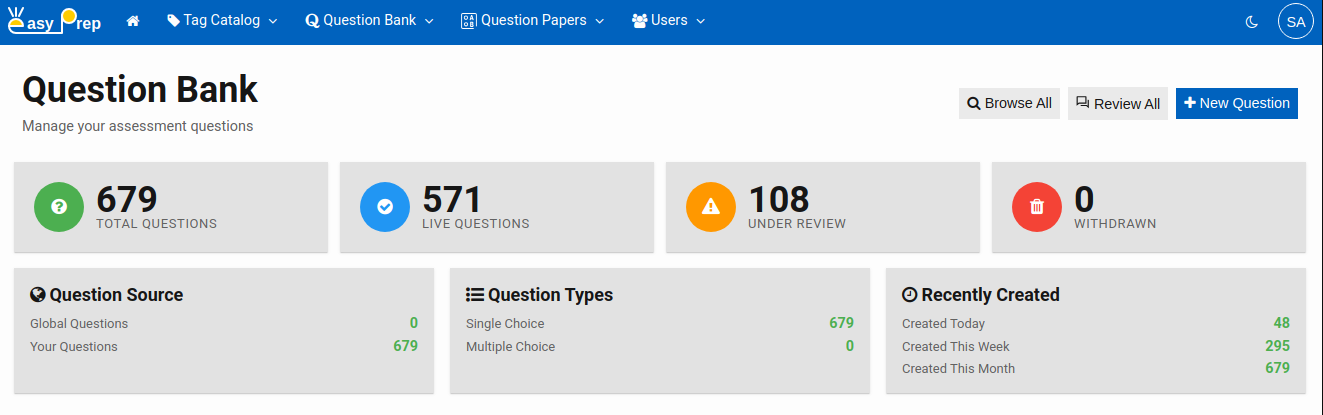
When you open the Question Bank, the home page greets you with an at-a-glance summary of your library:
| Card | What it means |
|---|---|
| Total Questions | All questions in the bank, regardless of status |
| Live Questions | Questions that have been reviewed and published |
| Under Review | Newly created or edited questions awaiting review |
| Withdrawn | Questions that were live but have since been taken down |
Below the summary cards you can also see breakdowns by Question Source (global vs. your questions), Question Types, and Recent Activity (created today / this week / this month).
# Question Types
Currently, the platform supports two types of questions:
| Type | Description |
|---|---|
| Single Choice | This question type presents multiple choices of answer. Out of them exactly one option is correct. Students select one answer. |
| Multiple Choice | This question type presents multiple choices of answer. But two or more options are correct. Students select all that apply. |
When you create a question you choose the type upfront. The editor adjusts itself to the chosen type of question.
# The Publish Workflow
Every question moves through three possible statuses:
Under Review → Live → Withdrawn
| Status | Meaning |
|---|---|
| Under Review | The question has been saved but not yet approved. It is visible to reviewers but not assigned to tests. |
| Live | The question has been reviewed and published. It can now be included in papers and test sessions. |
| Withdrawn | The question was live but has been removed from active use. It remains in the bank for reference. |
A question is always created with the status Under Review. A reviewer then inspects it and either publishes it (Live) or keeps it for further editing. A live question can later be withdrawn if it needs to be retired.
Note: A question that is Live must cannot edited directly or deleted. To make changes, it should be withdrawn first. (An exception is Bulk update questions that can change its tags and source). Deleted questions are gone forever. They can not be recovered.
Tip A question that has gone live and used in papers, should not be deleted even after withdrawn. It will corrupt the question papers and their submissions processing.
# How Questions Connect to the Tag Catalog
Questions do not exist in isolation — they are organized through your Tag Catalog (Tag Groups, Tags, and Tag Hierarchies). When you create a question you assign tags to it from the Tagging tab. This is what makes it possible to:
- Filter questions by subject, chapter, difficulty, or any other dimension (Tag Group) you have defined
- Include questions in a paper based on tag criteria
- Generate analytics by topic or subtopic
Setting up your Tag Catalog before adding questions means your content will be organized from day one. If you have not done so yet, see the Tag Catalog overview guide.
# Getting Started
The three main tasks in the Question Bank are:
- Creating Questions — add new questions, fill in choices, add explanations, tags and relevant details
- Reviewing Questions — inspect and approve (publish) questions
- Searching and Filtering — find questions, bulk-update questions for status, source, or tags